Images 2.5 is here.
Start with a graphic you need.
Make something useful.
Keep the part you chose.
 Start with the useful partGet this week's 30-second filter.Read the whole issueWhat changed and how I'd use it.
What changed. What you can try. What you can leave alone.
My goal: save you time, reduce noise, and help you make steady progress.
A note from Joyce
Start with something already on your list
A new image model is easier to judge when you've already got something to make. A handout cover. A workshop graphic. The image you've put off fixing because every correction seems to change something else.
That's where I'd start with this week's ChatGPT Images update. Library also got more useful, Deep Research expanded into Work and Codex, and Acrobat added ways to turn documents into visual summaries. There are a few useful paths here if you've already got something to finish.
Meanwhile, a conversation in the Lab this weekend came back to finding useful work inside long AI chats. I'll come back to that, too. Getting a new result is only part of the job; being able to find the one you wanted matters.
Read this first
This issue in 30 seconds
Images 2.5 is here.
Try a graphic you already need. Check the exact words and what changed after an edit.
Read the story CHECK YOUR ACCESSMore files in Library.
Box, Dropbox and SharePoint join Drive. Choose the right source and inspect any new permission request.
Read the story KEEP THE USEFUL PARTThe idea is somewhere in that chat.
Recover one accepted decision, keep its source, and choose the next small step.
Read the story RESEARCH WITH AN OUTPUTResearch you can put to work.
Deep Research expands into Work and Codex. Start with a decision and request an editable comparison with sources.
Read the story WATCH THE FOLLOW-THROUGHThe pacing debate got specific.
Look for independent review and observable controls as the proposals develop.
Read the story USE A DOCUMENT YOU HAVEYour PDF can become a visual summary.
Acrobat adds visual and audio tools. Try an approved handout or service overview if your plan includes them.
Read the storyIf you do one thing: Try the update that touches a job you've already got. Make the graphic, retrieve the source, or recover the decision. You don't need to do all three.
A better image model should make the correction easier
Give Images 2.5 a small, specific job you can actually inspect.
OpenAI introduced ChatGPT Images 2.5 on September 8. The company says it improves detail, targeted edits and consistency across repeated revisions, with faster generation. Those are release claims. The examples below show a small generation-and-edit workflow; there is no comparison against an earlier model here.
The update also brings templates, sketch-based input and comments on images. These are different ways to show what you mean when another paragraph of instructions isn't helping.
Where to start
In ChatGPT, ask for an image or choose More, then Images. You can upload an existing image and describe the change. In the mobile app, @Sketch lets you draw a starting layout. Templates are available from Images in the sidebar, but aren't yet available in Work mode.
The rollout covers all tiers. Some modes and features have different availability, and your plan's allowance still applies. Check what your account offers before planning a batch of graphics.
Try one graphic you already need
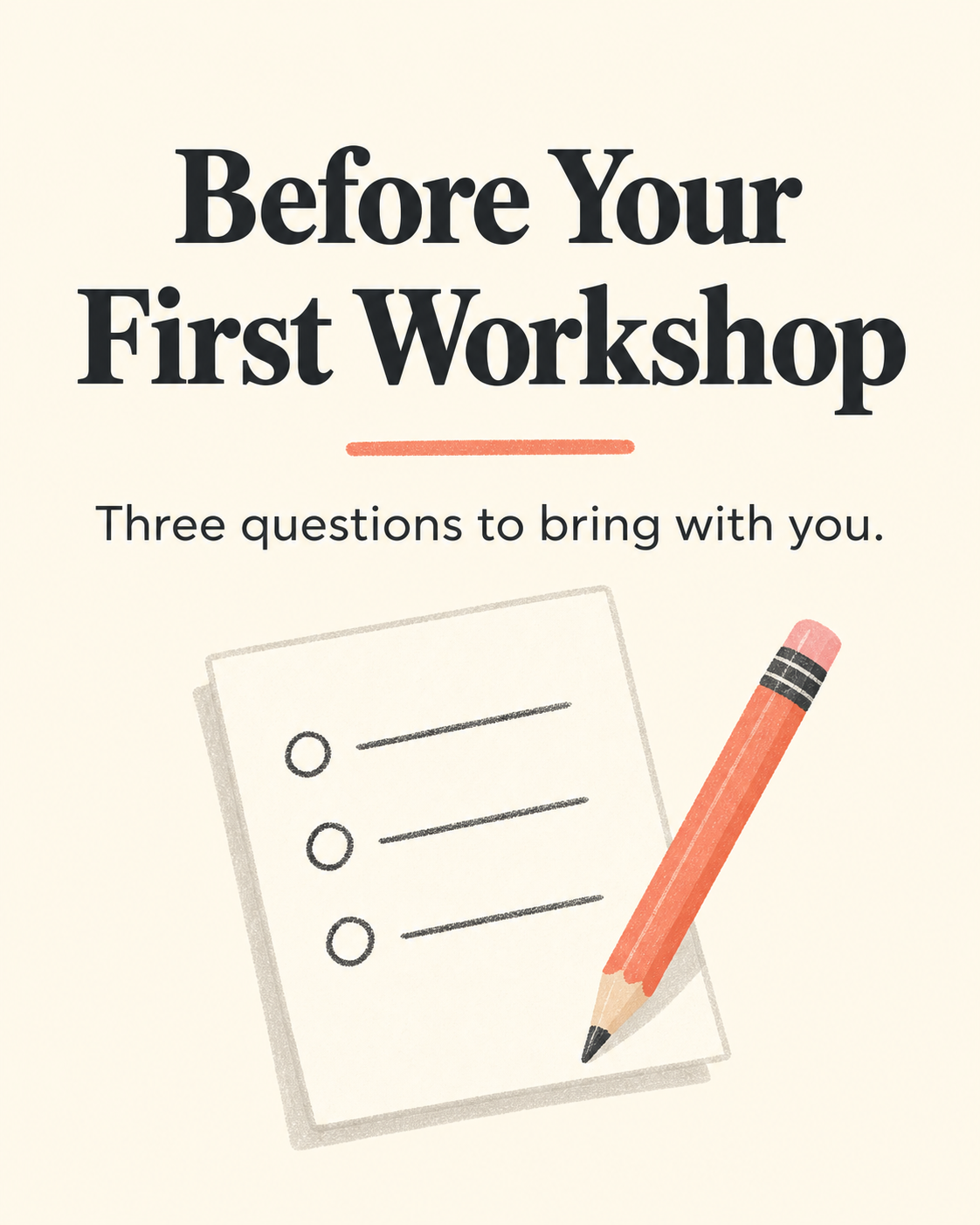
A resource cover is a useful first job because you can check the words, layout and readability. Here's a fictional workshop example you can adapt.
Filled-in example
Create a vertical 4:5 cover for a fictional workshop handout. Exact title: Before Your First Workshop. Exact subtitle: Three questions to bring with you. Use a warm cream background, charcoal text and one coral accent. Include a simple paper-and-pencil illustration. Keep the title readable at phone size. No logos, dates, prices, extra words or endorsements.
The edit instruction we used
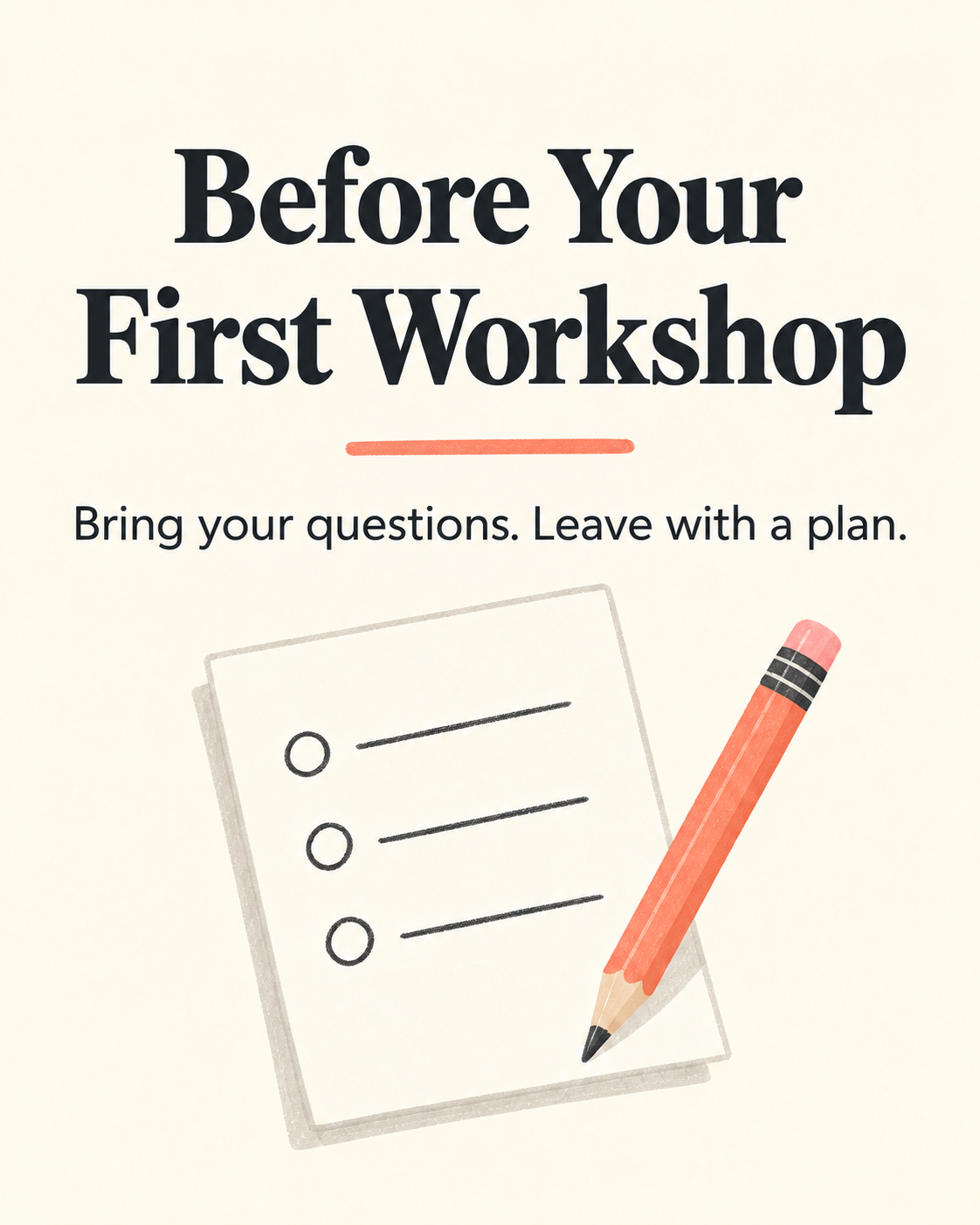
Use case: text-localization. Edit target: the provided workshop handout cover. Change only the subtitle to the exact text: "Bring your questions. Leave with a plan." Preserve the title "Before Your First Workshop", its lettering, position, and size; preserve the warm cream background, coral underline, paper-and-pencil illustration, colors, texture, spacing, and 4:5 aspect ratio. Keep the replacement subtitle in the same charcoal sans-serif type style and centered in the same area. Do not add anything else.
What these examples establish
We generated these graphics for this issue through Codex's image tool and checked the wording and layout. The tool did not report a model ID, so we can't independently attribute these outputs to Images 2.5. This is one example of the workflow, with a fictional workshop; it doesn't establish a speed or quality improvement.
Read every word in the result. If the subtitle is wrong, ask for that specific correction and inspect the whole image again. OpenAI's help notes that edits can extend beyond the selected area.
After two correction attempts, decide whether to keep it, add the final words in your usual design editor, or use a simpler cover. That's a suggested work boundary, not a platform limit.
A graphic for this very Brief
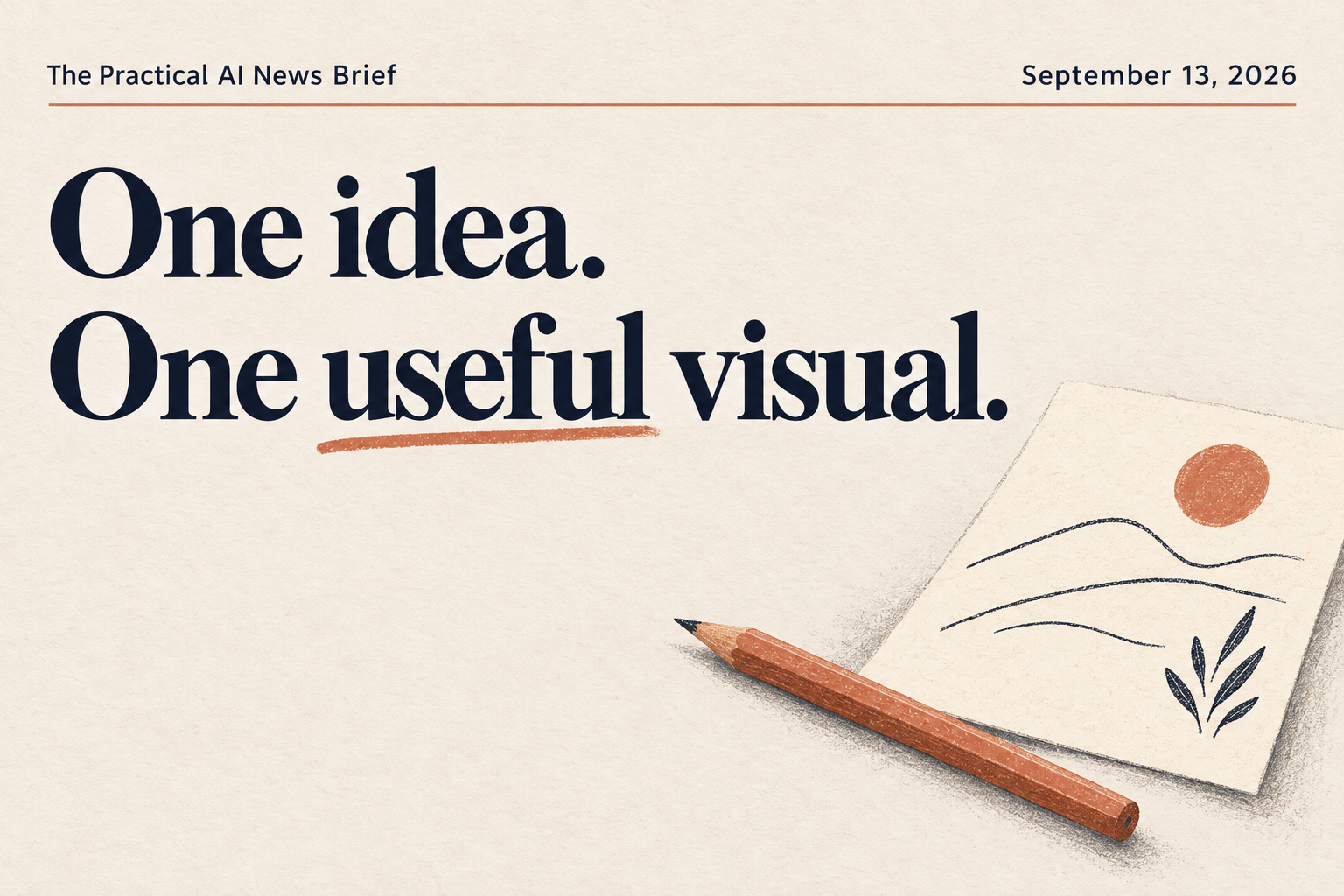
For a second use, we made a share card for this issue using the Brief's name, date and cream, navy and terracotta colors. The title and date came through correctly. The illustration added a small landscape motif, although the prompt asked for abstract lines. That may suit this card, but it's another detail to inspect before accepting a result.
Library can bring more of your files into the conversation
Less repeated uploading helps, as long as you've selected the right source.
On September 10, OpenAI added Box, Dropbox and SharePoint alongside Google Drive in ChatGPT Library. Once connected, you can browse files and folders, add a source to a conversation and return to the original from citations.
It's a staged web rollout for eligible plans in Chat and Work. Your existing file permissions and workspace controls still apply. Having Library in your account doesn't mean every provider connection is available.
Use it on a source you already work from
Choose Add from Library or use an @mention to select the relevant file. If you're asked to connect or reconnect a service, read the permission request first. A folder is useful only when you actually need the files inside it.
A small source check
Using only the workshop outline I selected, list the preparation questions it actually contains. Point to where each appears. If something is missing or unclear, say so. Draft the list here for my review.
If the outline contains two questions, the result should show those two. It shouldn't invent a third to make the handout look complete. And if you've got several versions, identify the current one before asking AI to work from it.
One separate sharing detail
Uploading a file into someone else's shared Library folder gives that folder's owner ownership of the uploaded file, according to OpenAI. Removing your access doesn't remove it. That's different from browsing a connected source file.
The useful part is halfway up the chat
You don't have to reopen every idea to return to one of them.
You work through a problem with AI, land on something useful, and leave the conversation to do the next thing. When you return, the chat has three possible directions, an abandoned outline and a suggestion that sounds familiar enough to feel like a decision.
Returning to parked ideas and repeating context came up in the Lab this weekend. It's a small set of conversations, but the friction is recognizable: you have to reconstruct the work before you can continue it.
A September 7 conversation on Using AI at Work, with Rana Gujral, asks a related question: are people making decisions, or simply approving what AI suggests? It's a practitioner discussion. I wouldn't turn it into a claim that AI use inevitably weakens judgment.
Recover one decision, with something to check it against
Start with the relevant, non-sensitive section of a chat you already know. A small excerpt is enough for this exercise.
A way back into the work
From this excerpt, recover the decision we actually made about the workshop handout. Separate accepted decisions from suggestions. For each decision, point to the sentence that supports it. If we never chose, say so. End with one next action. Don't invent a date, price or promise.
Worked example, fictional
The source supports a one-page attendee checklist. A five-part course was only suggested. Save the checklist decision, the sentence that supports it, and the next action: write the three preparation questions.
Read the source before accepting the recovered decision. Then keep the accepted note with a link or excerpt that lets you check it again. A confident summary can still mistake a suggestion for something you approved.
Deep Research can end with something you can use
Start with the decision you need to make, then ask for the format that will help.
On September 9, OpenAI expanded Deep Research into ChatGPT Work and Codex. It can investigate questions across the web, supplied files and supported connected apps, then produce an editable document with citations. Depending on the tools available, you can also request a presentation, spreadsheet or Site.
For someone planning a workshop, that could mean comparing three venues and finishing with a short decision sheet. The useful part is being able to check the options against your requirements and keep the comparison you actually need.
Give the research a finish line
In Work, type @Deep Research or explicitly ask for deep research. Give it the question, your requirements and the output you want. You can answer clarifying questions and steer the research while it runs. For a single opening time or quick fact, an ordinary search is usually enough.
Example to adapt: choosing a workshop venue
Use deep research to compare these three workshop venues: [names or public links]. My requirements are [location, audience size, budget and accessibility needs]. Use official venue pages. Create an editable comparison with source links for capacity, listed price, included equipment and accessibility information. Mark anything unconfirmed, including date availability. Recommend one option against my requirements and list what I still need to ask. If a downloadable document is supported, create it and provide the file link.
Before using the recommendation, open the sources behind the details that would change your choice. A listed room capacity doesn't confirm that the room is available on your date. If you requested a file, open it too; a promise to make the document isn't the finished document.
Check the allowance before starting
This expansion covers Plus, Pro, Business, Enterprise and Edu users with Work access. Deep Research in Work uses your Work/Codex allowance or credits. The separate Deep Research allowance in Chat is unchanged. Source connections and output formats depend on your account, permissions and available tools.
The pacing debate got more concrete
Watch what becomes independently verifiable.
Dario Amodei, Anthropic's CEO, is calling for a more measured pace of development for the most powerful AI systems. His proposal includes outside evaluators with ongoing access to check safety practices. Anthropic says it intends to bring in an external review team in the near future.
On September 9, OpenAI also called for mandatory national safety requirements tied to what AI systems can do, alongside industry standards. These are consequential positions from the companies building the technology.
They don't establish that the industry has agreed to pause, or that the proposed independent oversight is already operating.
How to read the next headline
Ask what stage it describes: a proposal, a company commitment, an enforceable requirement, or a working control. Then look for evidence of what changed in practice.
Your useful document doesn't have to stay a PDF
Acrobat's new tools offer visual summaries, audio and a way to restyle plain documents.
Adobe announced new Acrobat capabilities on September 9, including interactive reports, summary slides, personal podcasts and audio summaries. The visual tools can turn dense source material into something easier to scan; the audio tools offer another way to review it.
The new Stylize feature also uses Adobe Express templates to reformat plain documents. Adobe says it preserves the source content as it changes the layout. That's a claim to check against your own original before using the result.
Start with a handout you already trust
If you've already got a clear workshop handout or service overview, try making a short visual summary for someone who needs the main steps at a glance. Choose one format first. A personal audio summary might help you prepare; a visual summary might help your attendee or client.
Example to adapt: a workshop summary
Using only this approved workshop handout, create a short visual summary for attendees. Keep the preparation steps, requirements and caveats faithful to the source. Preserve exact dates and prices if they appear; add none if they are missing. Show where the main points come from and list what you left out so I can review it.
Compare the result with the source, especially anything an attendee needs to bring, do or understand. A cleaner layout is useful only if it still says what you meant. This is a suggested exercise; we haven't tested these Acrobat features for this issue.
Useful if your plan already includes it
Adobe lists the audio and visual capabilities in Acrobat Studio, Acrobat Express and Acrobat AI Assistant Plus plans. Check the features in your account before starting. If you already have a document or presentation tool that does this job well, keep using it.
Put one useful thing to work
Before you call the graphic finished
A short review for the image you already needed. Use it after generation or after an edit.
0 of 3 checks complete.
Accepted words: Before Your First Workshop / Three questions to bring with you. Source: My workshop note, section Before attending. Final file: workshop-handout-cover-v1.png. Next action: Write the three preparation questions. Still undecided: Workshop date and price.
Filled-in fictional example. Replace the details with your own before saving.
Done means: You have a reviewed graphic and enough context to use it again. If it's still drifting after two correction attempts, use your usual design editor or a simpler version.
Put the useful part to work
Your member guides
Make the Graphic You Actually Need
Standard membership and above. Build a clear visual brief, study a real image revision, and keep your prompts and review notes together.
One Source, Three Finished Assets
Premium + VIP. Turn one approved source into a handout, a short slide deck and a graphic. Includes editable examples and a workbench for checking each result.
Sign in to the Learning Hub with your member account. See Lab plans.
No extra assignment
What you can leave alone
A new visual project you didn't need
An image-model release doesn't have to create another item on your list. Try it when you've got a reason.
Every file in your archive
More connectors don't mean every task needs a larger source set. Select the material the job calls for.
A research project for a quick lookup
Use deeper research when you need to compare evidence across sources. An ordinary search may answer the smaller question.
A new subscription for one summary
Check what your current tools can do before adding another plan. Start with the document and the format you actually need.
Source note: Selected product announcements and help pages were rechecked on September 13. Company performance and safeguard claims are attributed to their sources. The Images story includes three generated graphics and a visual review; the generation tool did not expose a model ID. Other product tests and model-to-model comparisons were not run. The Human Beat draws on a small, anonymous community signal and a practitioner discussion, not a new research study.
What I'm watching
I'm watching whether Images 2.5 makes small corrections easier, whether research and document tools help us finish work with less cleanup, and whether the pacing proposals lead to independent oversight people can inspect.
One question
What's one thing you've already got in progress that one of these updates could help you finish?
Want help using this in your own work?
Bring the useful part into the Lab.
Bring the graphic you're trying to finish, the idea you want to return to, or the task you're deciding whether to hand off. We'll work through the part that matters to your business.
The Self-Taught AI Lab
Practical help, existing resources, and a place to work through your next step. Choose the membership that fits.